
Help › Everyday use
The AI assistant
Ask about your computers in plain words. Set it up with your own AI account or plan, keep spending in check, and know exactly what it can and can't see.
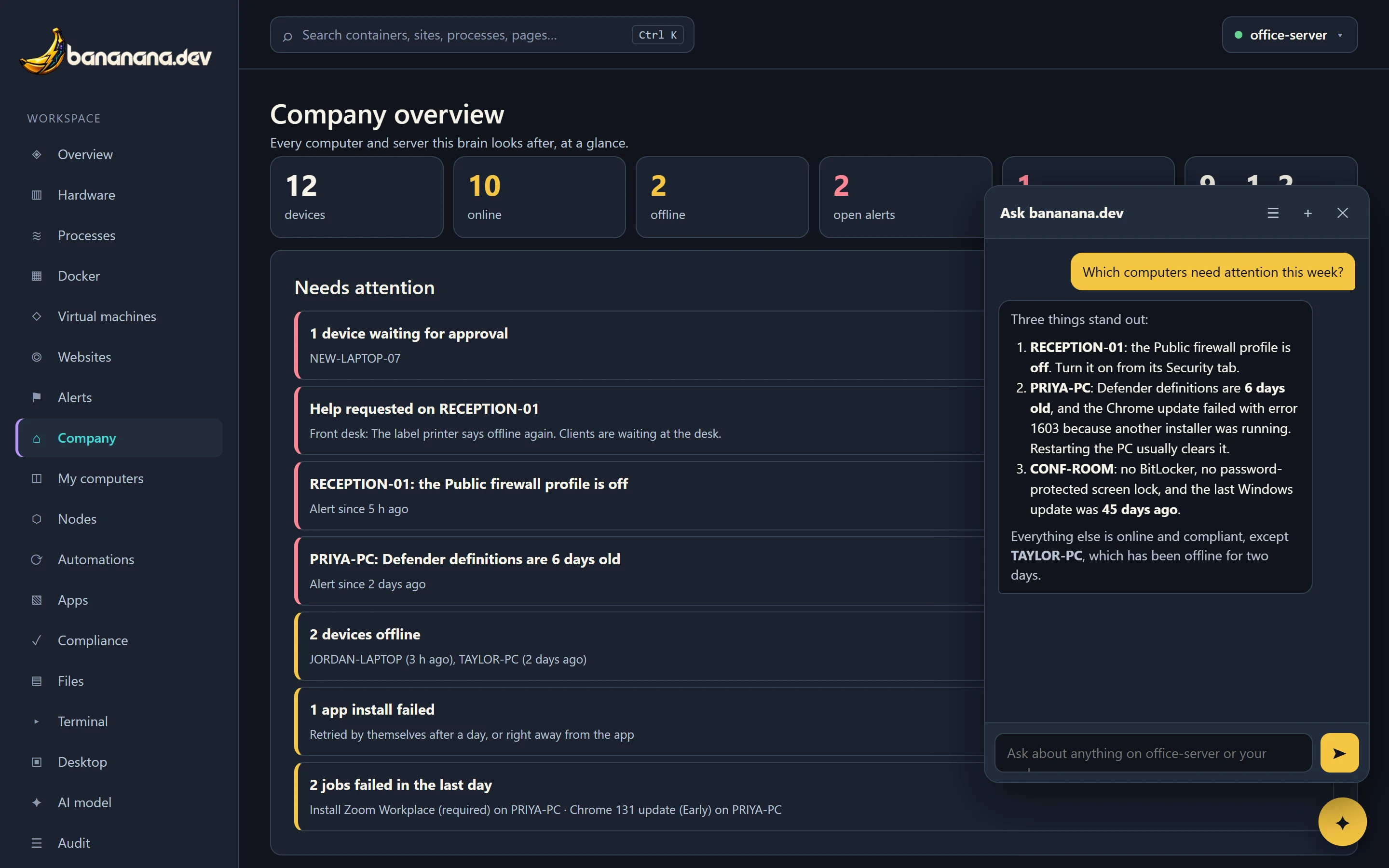
The yellow ✦ button at the bottom right of every page opens the assistant. Ask a question the way you'd ask a colleague; it looks things up and answers in a few sentences, saying what it checked.
Good questions to ask
Fleet
- Which computers need attention this week?
- Which PCs have old antivirus definitions?
- What did Defender find this week?
- Which computers aren't compliant, and why?
Apps and updates
- Which PCs are missing Chrome?
- What's installed on PRIYA-PC?
- How is the Chrome rollout going?
- Which devices need a restart after updates?
The server
- Why is the server slow?
- Which container uses the most memory?
- Show the last errors from the nextcloud container.
- Is any website down?
One computer
- What's using the CPU on JORDAN-PC?
- Is the print spooler running on RECEPTION-01?
- What's in C:\Shared\Scans on CONF-ROOM?
- Read the end of the setup log on NAS-01.
It can also suggest automations: on the Automations page, press ✦ Suggest automations and it drafts a few based on your devices, which you review before turning any on.
What it can and can't do
- Read only. It can't restart, install, change or delete anything. When something needs doing, it tells you what to press or which command to run.
- Your permissions. It sees exactly what you're allowed to see: the devices in your scope, the kinds of data your role allows. An employee asking it about someone else's computer gets nothing.
- No secrets. Password files, private keys,
.envfiles, the dashboard's own data and anything that looks like a password or API key are refused or blanked out before the AI sees them. - Files need permission. Reading files is a separate permission ("Let the chat read files") that an Admin turns on per role.
Setting it up
bananana.dev doesn't come with an AI of its own; it uses your company's. Open AI model in the menu (it needs the "AI model settings" permission).
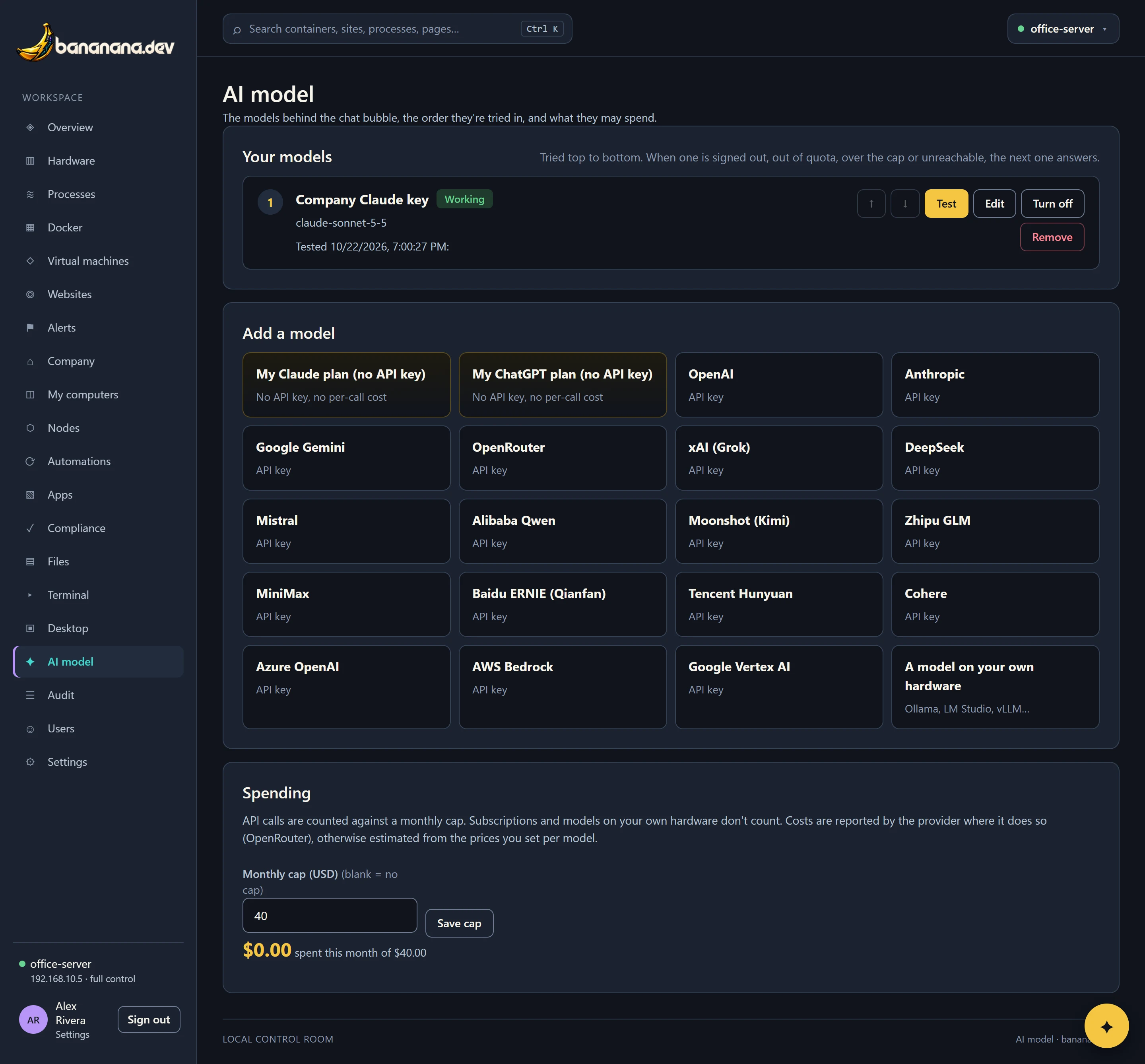
- Press the provider you use under Add a model.
- Paste the API key (or, for "My Claude plan" and "My ChatGPT plan", press Save and sign in and sign in to your plan in the window that opens: no API key needed).
- Pick a model and press Test. A green "Working" means it answered and can use the tools.
- Add a second one if you like. If the first fails or runs out, the assistant moves to the next. Use the ↑ and ↓ buttons to change the order; Turn off skips one without removing it.
Providers you can use
My Claude plan and My ChatGPT plan (no API key; uses your subscription), OpenAI, Anthropic, Google Gemini, OpenRouter, xAI (Grok), DeepSeek, Mistral, Alibaba Qwen, Moonshot (Kimi), Zhipu GLM, MiniMax, Baidu ERNIE, Tencent Hunyuan, Cohere, Azure OpenAI, AWS Bedrock, Google Vertex AI, and a model on your own hardware (anything that speaks the OpenAI format, such as Ollama or LM Studio).
Spending
Under Spending you see what the API keys cost this month, and can set a monthly limit in dollars. Once it's reached, the assistant stops using paid keys until the next month. Subscription plans and models on your own hardware cost nothing per question.