
Help › Security
Windows security: Defender and firewall
See every PC's antivirus, firewall and detections, and act on them: scans, definition updates, settings, exclusions and firewall rules, with honest results and a firewall change that can never cut a PC off.
Windows already comes with good protection: Microsoft Defender and the Windows Firewall. bananana.dev doesn't replace them; it shows you what they report on every PC, and lets you manage them from one place. Open a device and choose the Security tab (needs "Security status").
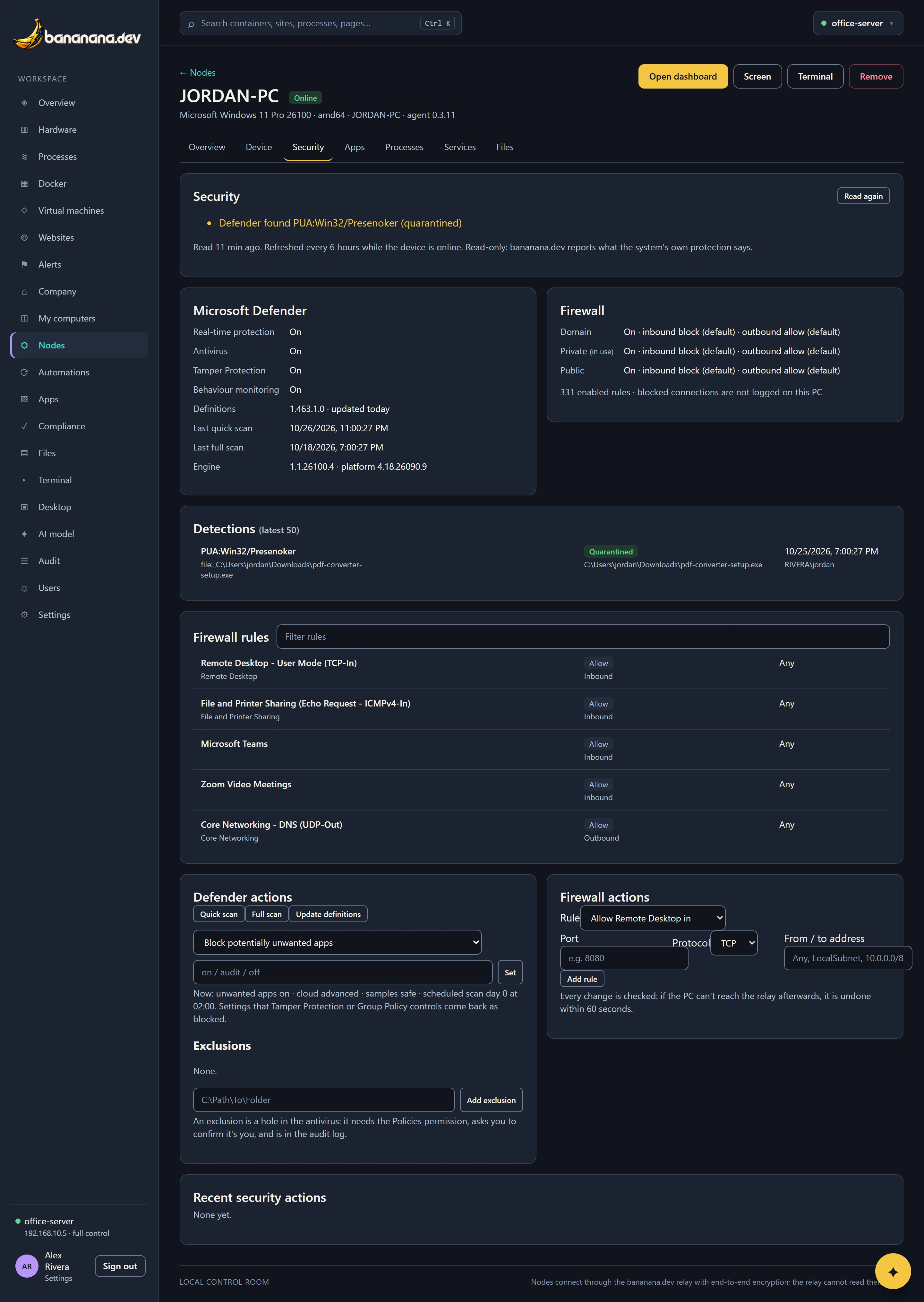
What you see
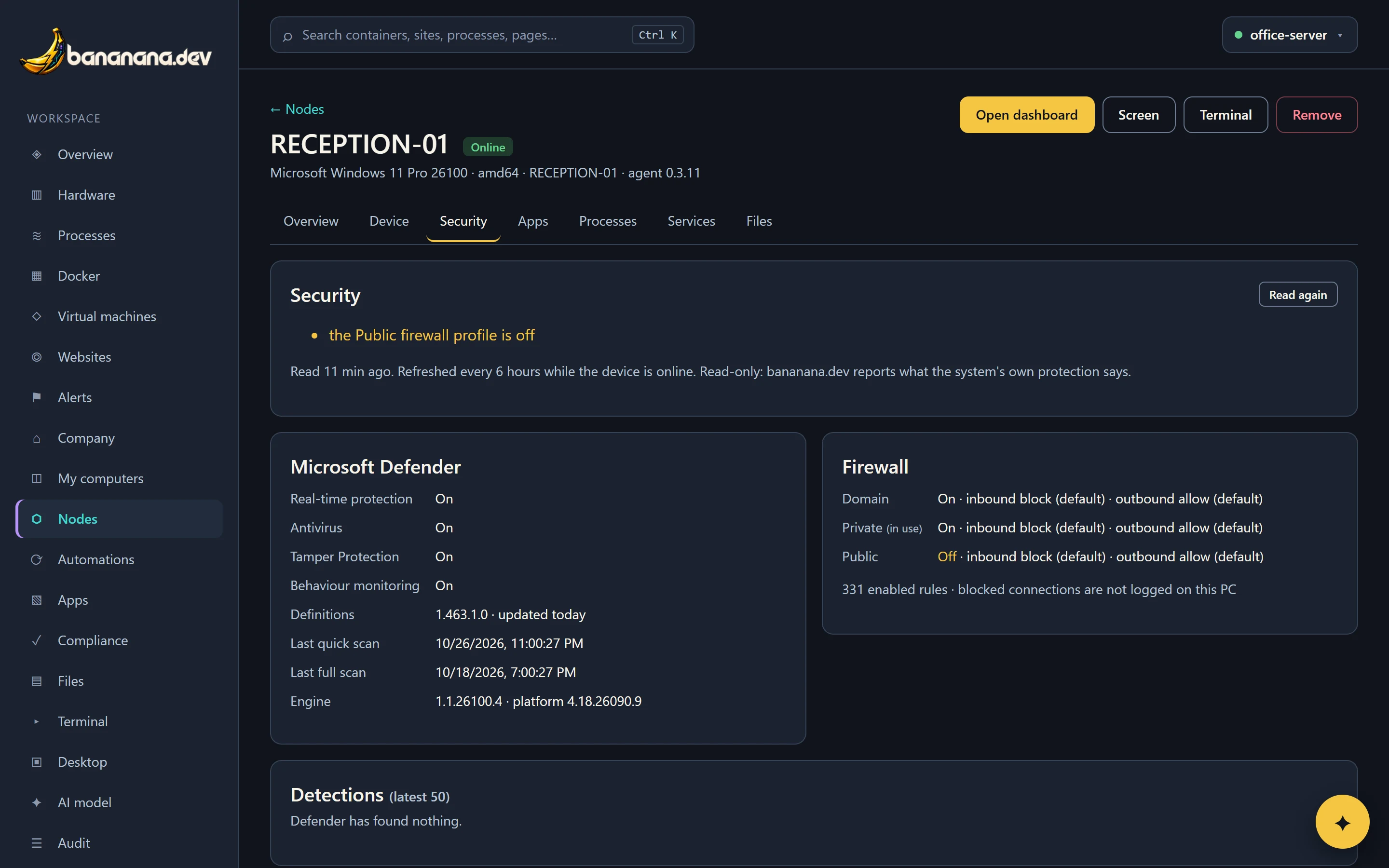
At the top, Nothing needs attention in green, or a list of problems. Then:
Microsoft Defender
- Real-time protection, antivirus, Tamper Protection and behaviour monitoring: on or off
- Definitions version and how old they are
- Last quick and full scan
- Engine and platform versions
- Any other antivirus installed (Defender steps back while one is active, and that's fine)
Firewall
- The Domain, Private and Public profiles, on or off, with their default inbound and outbound rules, and which one is in use
- How many rules are enabled, with a filterable list of every rule
- Recently blocked connections, if the PC logs them
Under Detections, the last 50 things Defender found: the threat, the file and process, who was signed in, when, and what Defender did about it. Macs and Linux computers show whether their firewall is on, and disk encryption on the Compliance page.
The reading is refreshed every six hours and after each action; Read again refreshes it now.
Defender actions
With "Security actions (scans, firewall rules)" in your role and the Terminal feature on the PC:
| Action | Does |
|---|---|
| Quick scan | Scans the places malware usually hides. A few minutes. The result lists anything found in the last two hours. |
| Full scan | Scans everything, in the background. An hour or more, and the PC is a little slower meanwhile. Detections appear on the tab. |
| Update definitions | Downloads the newest definitions now, and reports the version before and after. |
| Turn real-time protection on | Shown when it's off. bananana.dev can turn protection on, but never off. |
| Settings | Block potentially unwanted apps (on, audit, off), cloud-delivered protection (basic, advanced), sending samples to Microsoft, and the scheduled scan's day and time. |
Exclusions
An exclusion tells Defender not to scan a folder or file, sometimes needed for an accounting or practice-management app that Defender slows down. It's also a hole in the antivirus, so it's restricted: it needs the "Policies and baselines" permission, asks you to confirm it's you, and is written to the audit log with the path. Give a full path like C:\Clio\Cache; whole drives aren't allowed.
Firewall actions
- Turn a profile on: one click when a profile is off.
- Add a rule from an approved template: allow Remote Desktop in, allow ping in, allow file sharing (SMB) in, allow a port in, block a port in, or block outgoing connections to an address. For ports, give the port and protocol, and optionally limit it to an address, range or subnet (
LocalSubnet,10.0.0.0/8). - Remove a rule that bananana.dev added. Rules made by Windows, other apps or Group Policy can't be removed from here.
Rules bananana.dev adds are named "bananana.dev: …" so you can find them in Windows too.
A firewall change can never cut a PC off
The worst firewall mistake blocks the very connection you're using to fix it. bananana.dev prevents that:
- Before changing anything, the PC schedules an undo for 60 seconds later.
- It makes the change, then checks it can still open a fresh connection to the relay. If not, it undoes the change straight away and reports Rolled back.
- If that works, the result travels back to the brain, and the brain immediately sends a confirmation through the same encrypted link. The PC checks the relay once more and cancels the undo.
- If the confirmation never arrives (because the change broke the link after all), the scheduled undo puts things back within a minute.
This works on laptops running on battery too.
Honest results
Every action appears under Recent security actions with its state and output:
| State | Means |
|---|---|
| Done | It worked, and bananana.dev read the setting back to make sure. |
| Blocked | Windows didn't let it happen, with the reason: "Tamper Protection protects exclusions", "Group Policy sets Cloud-delivered protection", "Group Policy ignores local firewall rules on this PC". bananana.dev never works around Tamper Protection or Group Policy, and never reports a blocked change as done. |
| Rolled back | A firewall change would have cut the PC off, so it was undone. |
| Failed | Something else went wrong; open Output. |
Alerts and the AI
Protection off, definitions older than 3 days, a detection in the last week, or a firewall profile off on any PC raises an alert (Alerts and email) and shows on the Company overview. You can also ask the assistant "which PCs have old definitions?" or "what did Defender find this week?".